Native Interop on Flutter: Going bare metal with a JNIGEN + FFIGEN plugin
The time was Spring 2025, the Google IO conference was fast approaching and prep for my eventual talk, How Flutter makes the most of your platforms , was in progress. But the code bolstering my talk was not done yet, ironically a state I find myself in at the time of writing for another Flutter event but I digress.
The core demo showed how to retrieve and store data in Android HealthConnect. One roadblock I hit pretty quickly was how to manage permissions. It’s fairly common on Android for some library developers to create custom permissions to gate access to user data.
Unfortunately, most of the packages on pub.dev don’t allow for this and assume you are using one of the ones defined in Manifest.permission. I didn’t want to rely on a kludge like manually granting permission out of band so before I could get to the real app, I needed a way to get permissions.
|
Note
|
Direct native interop is over 95% similar between Android and iOS. This post is in Android land but the process is similar for a C-ABI language and in fact JNIGEN is a layer on top of FFIGEN. |
Setup
flutter create --template=plugin permissions_plugin
flutter create -t plugin --platforms android .
flutter pub add jnigen jni_flutter jni
Running a build at this point gives a erroneous linting error so the Instantiatable check needs to be disabled in example/android/app/build.gradle.kts.
android {
  // ...
  lint {
        disable.add("Instantiatable")
    }
}
With that done, we can run the build of the example app cd example && flutter build apk && cd ...
jnigen uses a Dart API to specify the classes to generate, their locations, or package names if they exist in Maven repositories. Our current convention is to specify the configuration in tool/jnigen.dart. (The template doesn’t include this path, so create it and copy below.)
The androidSdkConfig line is why we needed to build the example project before we did code generation. A surprising part of the file is the sheer number of classes needed. The actual surface area for this plugin is very small but due to where the handful of required functions live, a lot of extra classes have to come along for the ride.
import 'dart:io';

import 'package:jnigen/jnigen.dart';

void main(List<String> args) {
  final packageRoot = Platform.script.resolve('../');
  final config = JniGenerator(
    input: Input(
      classes: [
        'android.app.Application',
        'androidx.activity.ComponentActivity',
        'androidx.fragment.app.FragmentActivity',
        'androidx.activity.result.ActivityResult',
        'androidx.core.app.ActivityCompat',
        'androidx.activity.result.ActivityResultCallback',
        'androidx.activity.result.ActivityResultLauncher',
        'androidx.activity.result.contract.ActivityResultContract',
        'android.content.Intent',
        'androidx.core.content.ContextCompat',
        'android.Manifest',
        'android.content.pm.PackageManager'
      ],
      androidSdk: AndroidSdk(addGradleDeps: true, androidExample: Uri.file('example/')),
    ),
    output: Output(
      dart: DartOutput(
        path: packageRoot.resolve('lib/gen/android.g.dart'),
        structure: OutputStructure.singleFile,
      ),
    ),
  );
  config.generate();
}
Run dart run tool/jnigen.dart and you will have a big generated file in lib/gen/android.g.dart. DartOutput has an output option to mirror the package structure and write out individual files. You really don’t want to do that. All together the content of ~130 classes are converted to Dart, clocking in at over 33,000 lines of code.
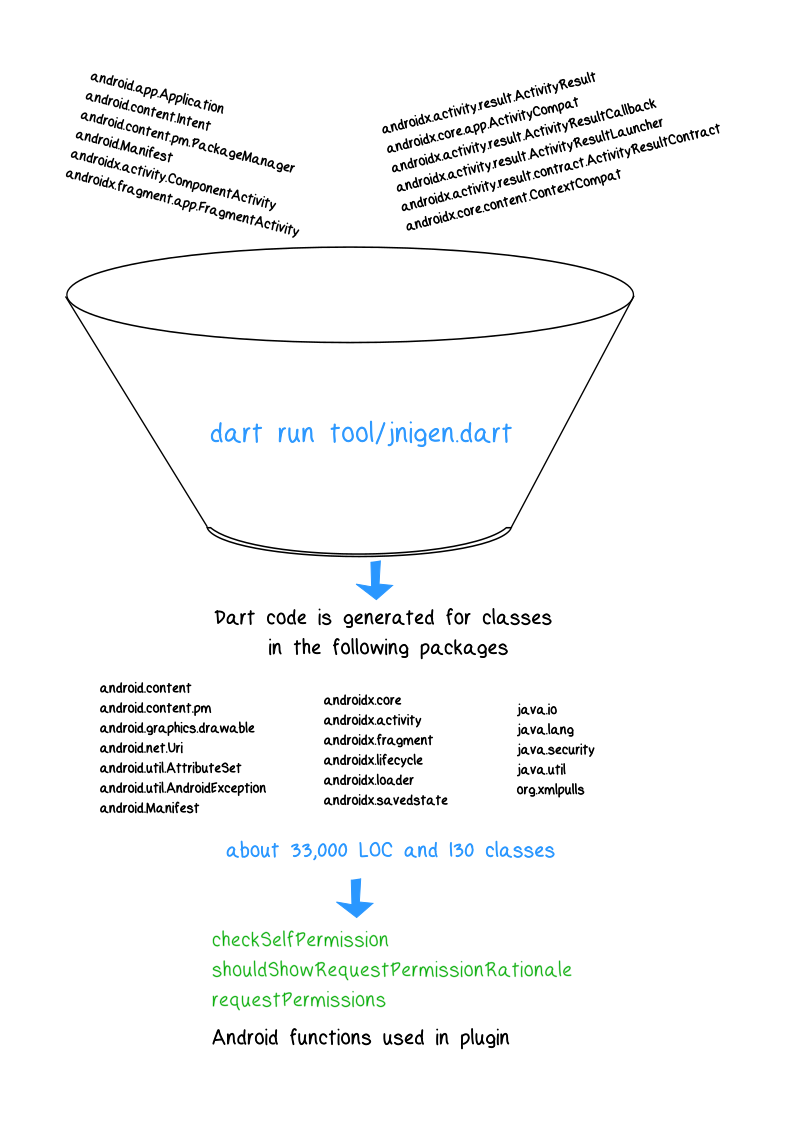
Behind the scenes, jnigen uses ffigen to generate C-compatible pointers and function calls. The resulting Dart code doesn’t look like true Java or Dart code. Here’s what one of the functions looks like. There is a lookup by id and parameter list for the method, an internal method that allows wrapping the parameters and the pointer locations to be as a function and run. Finally, the function signature that more closely matches the original API is exposed.
static final _id_startActivity = _class.staticMethodId(
    r'startActivity',
    r'(Landroid/content/Context;Landroid/content/Intent;Landroid/os/Bundle;)V',
  );

static final _startActivity =
      jni$_.ProtectedJniExtensions.lookup<
            jni$_.NativeFunction<
              jni$_.JThrowablePtr Function(
                jni$_.Pointer<jni$_.Void>,
                jni$_.JMethodIDPtr,
                jni$_.VarArgs<
                  (
                    jni$_.Pointer<jni$_.Void>,
                    jni$_.Pointer<jni$_.Void>,
                    jni$_.Pointer<jni$_.Void>,
                  )
                >,
              )
            >
          >('globalEnv_CallStaticVoidMethod')
          .asFunction<
            jni$_.JThrowablePtr Function(
              jni$_.Pointer<jni$_.Void>,
              jni$_.JMethodIDPtr,
              jni$_.Pointer<jni$_.Void>,
              jni$_.Pointer<jni$_.Void>,
              jni$_.Pointer<jni$_.Void>,
            )
          >();

static void startActivity(
    context$_.Context context,
    intent$_.Intent intent,
    bundle$_.Bundle? bundle,
  ) {
    final _$$classRef = _class.reference;
    final _$context = context.reference;
    final _$intent = intent.reference;
    final _$bundle = bundle?.reference ?? jni$_.jNullReference;
    _startActivity(
      _$$classRef.pointer,
      _id_startActivity.pointer,
      _$context.pointer,
      _$intent.pointer,
      _$bundle.pointer,
    ).check();
  }
Now we are ready to call the code.
Calling Generated Code From Dart
Our PermissionsPlugin uses only a couple of functions from the Android API:
- checkSelfPermission,
- shouldShowRequestPermissionRationale, and,
- https://developer.android.com/reference/androidx/core/app/ActivityCompat#requestPermissions(android.app.Activity,java.lang.String,int)[requestPermissions].
Out of the three, the one that may not be immediately clear is shouldShowRequestPermissionRationale. That’s often used when the user may have previously denied a permission that really is needed. In my code, it is there for completion but it’s not used.
import 'package:flutter/foundation.dart';

import 'gen/android.g.dart';
import 'package:jni/jni.dart';
import 'package:jni_flutter/jni_flutter.dart';

class PermissionsPlugin {
  bool checkPermission(JObject context, String permission) {
    // Returns a simple true or false if the permission has been granted
    var result = ContextCompat.checkSelfPermission(
      context as Context,
      permission.toJString(),
    );
    return result == PackageManager.PERMISSION_GRANTED ? true : false;
  }

  int checkAndRequestPermission(
    JObject context,
    String permission,
    Function callback,
  ) {
    // Do I have permission?
    if (ContextCompat.checkSelfPermission(context as Context, permission.toJString()) ==
        PackageManager.PERMISSION_GRANTED) {
      callback();
    } else if (ActivityCompat.shouldShowRequestPermissionRationale(
          androidActivity(PlatformDispatcher.instance.engineId!)! as Activity,
          permission.toJString(),
        ) ==
        true) {
      // Has the user denied the permission before?
      // Give a reason why I need the permission
      print("I should ask for permission");
      // TODO Flow to show UI to reshow perms dialog
      return -2;
    } else {
      // Ask for permission
      ActivityCompat.requestPermissions(
        androidActivity(PlatformDispatcher.instance.engineId!)! as Activity,
        JArray.of(JString.type, [permission.toJString()]),
        0,
      );
    }
    return 0;
  }
}
Our pubspec needs to have the outer project declared as a plugin, so add the following to the flutter section if it is note already there.
flutter:
  # This section identifies this Flutter project as a plugin project.
  # The 'pluginClass' specifies the class (in Java, Kotlin, Swift, Objective-C, etc.)
  # which should be registered in the plugin registry. This is required for
  # using method channels.
  # The Android 'package' specifies package in which the registered class is.
  # This is required for using method channels on Android.
  # The 'ffiPlugin' specifies that native code should be built and bundled.
  # This is required for using `dart:ffi`.
  # All these are used by the tooling to maintain consistency when
  # adding or updating assets for this project.
  plugin:
    platforms:
      android:
        package: com.example.permissions_plugin
        pluginClass: PermissionsPlugin
The main.dart file in the example project has a lot of MethodChannels calls and references by default so we’ll need to replace it with the following that actually calls our generated code.
// A simplified implementation of the main UI to demonstrate the JNI integration.
// Full implementation available in the repository.
class _MyAppState extends State<MyApp> {
  final _permissionsPlugin = PermissionsPlugin();
  bool _isGranted = false;
  String _lastActionStatus = 'Waiting...';

  void _checkPermissionStatus() {
    try {
      // Direct call to JNI-backed logic
      _isGranted = _permissionsPlugin.checkPermission(
        androidApplicationContext,
        "android.permission.CAMERA",
      );
      setState(() => _lastActionStatus = 'Checked: ${_isGranted}');
    } catch (e) {
      setState(() => _lastActionStatus = 'Error: $e');
    }
  }

  void _checkAndRequest() {
    try {
      _permissionsPlugin.checkAndRequestPermission(
        androidApplicationContext,
        "android.permission.CAMERA",
        () => setState(() => _isGranted = true),
      );
      setState(() => _lastActionStatus = 'Invoked check & request');
    } catch (e) {
      setState(() => _lastActionStatus = 'Error: $e');
    }
  }

  @override
  Widget build(BuildContext context) {
    return Scaffold(
      appBar: AppBar(title: const Text('Permissions (JNIGEN)')),
      body: Column(
        children: [
          Text("Status: ${_isGranted ? 'Granted' : 'Denied'}"),
          _lastActionStatus,
          ElevatedButton(onPressed: _checkAndRequest, child: const Text("Check & Request")),
          TextButton(onPressed: _checkPermissionStatus, child: const Text("Re-check Status")),
        ],
      ),
    );
  }
}
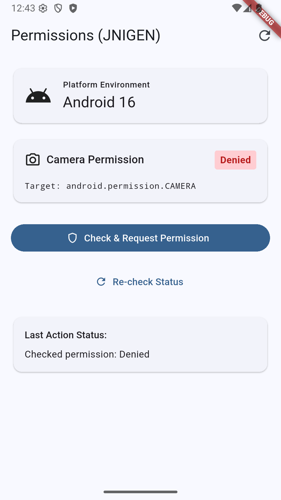
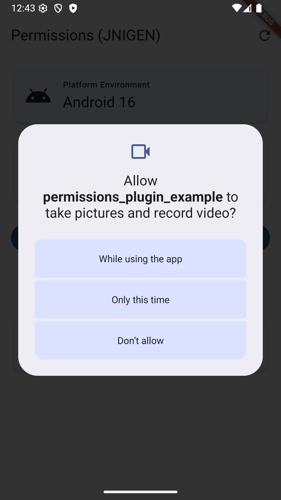
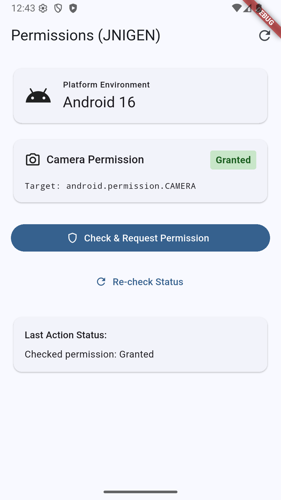
This checks for permission to access the camera. You can run it now (flutter run in the example/ dir) but it will always show as declined and won’t even show a dialog. The last step is to make sure any permissions are in the example\android\app\src\main\AndroidManifest.xml file.
<manifest xmlns:android="http://schemas.android.com/apk/res/android">
 <uses-permission android:name="android.permission.CAMERA" />
 <application ... ></application>
 /* ...*/
Et voilà! We have a sample app that uses a plugin to request Android permissions from Flutter.
Optional Removing Method Channels Code
The plugin templates predate JNIGEN so, at the time of writing, they assume you will be using MethodChannels and add a number of classes and tests relating to them. We don’t need any of that so we can go ahead and delete them. If you are running a coding agent, this would be a good time to use it remove the following files. The plugin builds and runs despite the files existing but don’t ship dead code.
rm -rf lib/permissions_plugin_platform_interface.dart lib/permissions_plugin_method_channel.dart test/permissions_plugin_test.dart test/permissions_plugins_method_channel_test.dart example/integration_test/plugin_integration_test.dart android/src/test/kotlin/com/example/permissions_plugin/PermissionsPluginTest.dartConclusion
While using JNIGEN allowed us to successfully make a plugin and keep the JNI logic to mostly one place, there was a lot of overhead. Thirty thousand lines of generated code that may or may not get partially tree-shaken in service of three or four functions is excessive. And this is all before we get to the main purpose of the app. To do the needed tasks with Health Connect, the jnigen config needs another fourteen classes. So who knows how many LOC that would add to the final product. And good luck if an API changed. I did have fun at the end of the day because of the quirky bits with JVM internals. But should your everyman developer have to dig that deep? Probably not.
Luckily, the next post will cover a new variant of the other native interop option, Pigeon. Pigeon has an experimental mode that can use native interop code.