Native Interop on Flutter, Part II
In the previous post, I covered the journey of creating a Flutter plugin using jnigen. It gave use bare metal control but that control came with the cost of a lot of generated code (30K lines worth) where very little of it was directly referenced(~3 functions).
This post will do the same task, creating a permissions plugin for Android, but this time using MethodChannels and pigeon.
Background
Platform Channels, often used interchangeably with the name Method Channels, allow Dart code to communicate with the host platform by opening up named communications channels that each side can interact with. Unlike jni/ffi where native code is being executed directly, platform channels rely on the host side doing some handling to receive the message, execute code based on the content of the message, and pass that information back through a channel.
A benefit of using platform channels is that it keeps the non-Dart code clean and unmangled. But you will have to still write that non-Dart platform code. One caveat is that regular platform channels are not type safe. Though the underlying protocol relies on serialization, a lot of arguments are loosely typed and surface as dynamic, and method/channel invocations are String-based. All of these together mean you can encounter the same kinds of run-time errors you could see with jni/ffi that compile totally fine.
Pigeon, Typesafe Interop Communication and Code Generation
Pigeon was conceived to address these drawbacks of creating MethodChannels by hand. Instead of manually specifying the channel to send a message or name of the function to invoke, pigeon uses code generation to standardize and enforce type safety.
General Setup
Our basic setup starts almost exactly the same as the jnigen version. We’ll discuss it in due time but pigeon can use jni/ffi with only a single flag in the configuration. For the moment, we’ll be using the MethodChannel version.
flutter create --template=plugin --platforms=android permissions_pigeon
flutter pub add pigeon jnigen jni_flutter jni
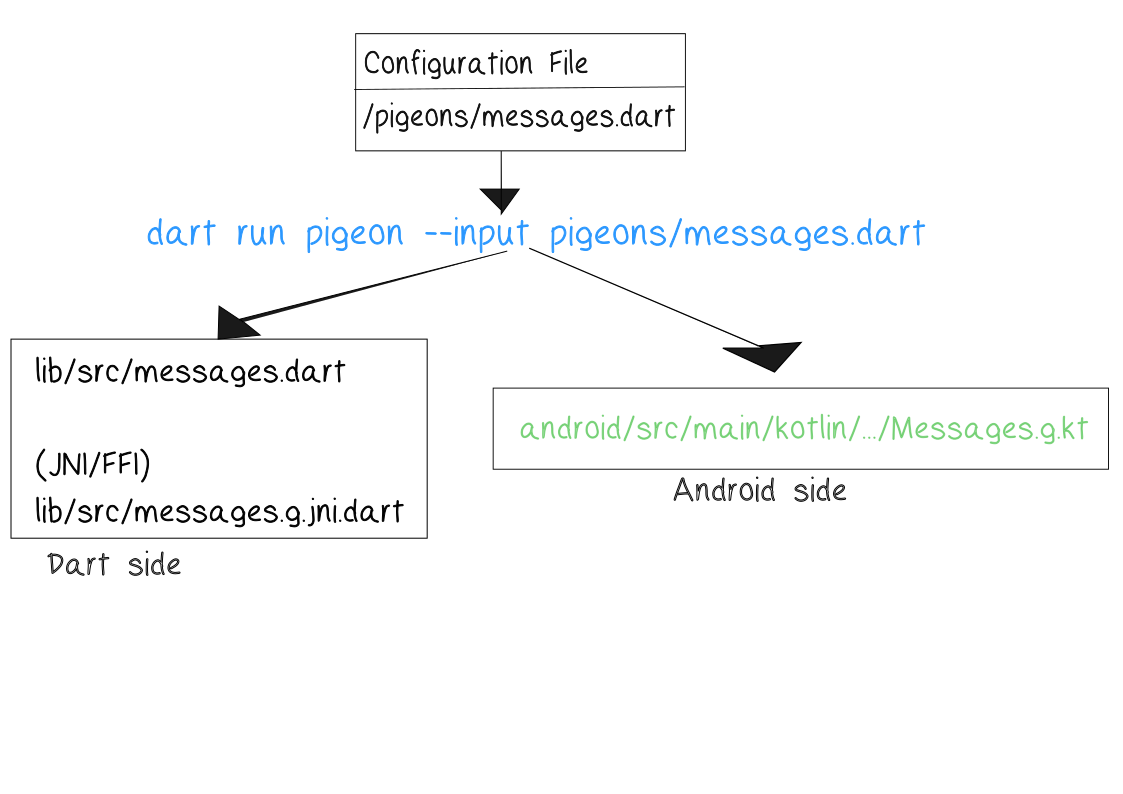
Here are the general steps to create a Pigeon plugin:
-
Add pigeon as a dev_dependency.
-
Make a Dart file configuration file defining the communication interface.
-
Execute the configuration file.
-
Implement the host-language code and add it to your build.
-
Call the generated Dart methods.
Declaring a @HostApi
Like the jnigen.dart file we used when creating a JNI plugin, Pigeon has a similar setup for specifying the interface you’ll be using. In PigeonOptions there are options for all supported target languages and platforms.
The @HostApi is the contract both sides will adhere to. All of the platform specifics, whether MethodChannels or native, will use the same interface.
import 'package:pigeon/pigeon.dart';

@ConfigurePigeon(
  PigeonOptions(
    dartOut: 'lib/src/messages.g.dart',
    dartOptions: DartOptions(),
    kotlinOut:
        'android/src/main/kotlin/com/example/permissions_pigeon/Messages.g.kt',
    kotlinOptions: KotlinOptions(
      package: 'com.example.permissions_pigeon',
      useJni: false,
      appDirectory: './example',
    ),
  ),
)
@HostApi()
abstract class PermissionsApi {
  String getPlatformVersion();
  bool checkPermission(String permission);
  int checkAndRequestPermission(String permission);
  bool shouldShowRequestPermissionRationale(String permission);
  void requestPermission(String permission);
  bool openAppSettings();
}
dart run pigeon --input pigeons/messages.dartHere’s an excerpt from the generated messages.g.dart file. Pigeon takes the abstract @HostApi and creates a discrete class implementing method channels.
For the checkPermission function from the @HostApi declaration, it automagically sets up a MessageChannel with a generated name and executes a future to send the content across the wire and retrieve the result.
 Future<bool> checkPermission(String permission) async {
    final pigeonVar_channelName = 'dev.flutter.pigeon.permissions_pigeon.PermissionsApi.checkPermission$pigeonVar_messageChannelSuffix';
    final pigeonVar_channel = BasicMessageChannel<Object?>(
      pigeonVar_channelName,
      pigeonChannelCodec,
      binaryMessenger: pigeonVar_binaryMessenger,
    );
    final Future<Object?> pigeonVar_sendFuture = pigeonVar_channel.send(<Object?>[permission]);
    final pigeonVar_replyList = await pigeonVar_sendFuture as List<Object?>?;

    final Object? pigeonVar_replyValue = _extractReplyValueOrThrow(
        pigeonVar_replyList,
        pigeonVar_channelName,
        isNullValid: false,
    )
    ;
    return pigeonVar_replyValue! as bool;
  }
On the native Android side (android/src/main/kotlin/com/example/permissions_pigeon/Messages.g.kt), Pigeon implements message handlers for all the methods matching what was declared in the messages.g.dart file.
        val channel = BasicMessageChannel<Any?>(binaryMessenger, "dev.flutter.pigeon.permissions_pigeon.PermissionsApi.checkPermission$separatedMessageChannelSuffix", codec)
        if (api != null) {
          channel.setMessageHandler { message, reply ->
            val args = message as List<Any?>
            val permissionArg = args[0] as String
            val wrapped: List<Any?> = try {
              listOf(api.checkPermission(permissionArg))
            } catch (exception: Throwable) {
              MessagesPigeonUtils.wrapError(exception)
            }
            reply.reply(wrapped)
          }
        } else {
          channel.setMessageHandler(null)
        }
We have our passageways setup but the app doesn’t do anything yet.
Adding Native Code
Just like before in the previous post, the plugin template assumes MethodChannels.
package com.example.permissions_pigeon

import io.flutter.embedding.engine.plugins.FlutterPlugin
import io.flutter.plugin.common.MethodCall
import io.flutter.plugin.common.MethodChannel
import io.flutter.plugin.common.MethodChannel.MethodCallHandler
import io.flutter.plugin.common.MethodChannel.Result

/** PermissionsPluginPigeonPlugin */
class PermissionsPigeonPlugin :
    FlutterPlugin,
    MethodCallHandler {
    // ...
}
It’s easiest to replace the whole file with the following code. In place of the MethodCallHandler, the plugin class implements ActivityAware and PermissionApi (from Messages.g.kt). These implementations are the ones that actually call native code.
package com.example.permissions_pigeon

import android.app.Activity
import android.content.Context
import android.content.Intent
import android.content.pm.PackageManager
import android.net.Uri
import android.os.Build
import android.provider.Settings
import androidx.core.app.ActivityCompat
import androidx.core.content.ContextCompat
import io.flutter.embedding.engine.plugins.FlutterPlugin
import io.flutter.embedding.engine.plugins.activity.ActivityAware
import io.flutter.embedding.engine.plugins.activity.ActivityPluginBinding

class PermissionsPigeonPlugin : FlutterPlugin, ActivityAware, PermissionsApi {
  private var context: Context? = null
  private var activity: Activity? = null
  private var binaryMessenger: io.flutter.plugin.common.BinaryMessenger? = null

  override fun onAttachedToEngine(binding: FlutterPlugin.FlutterPluginBinding) {
    context = binding.applicationContext
    binaryMessenger = binding.binaryMessenger
    PermissionsApi.setUp(binding.binaryMessenger, this)
  }

  override fun onDetachedFromEngine(binding: FlutterPlugin.FlutterPluginBinding) {
    context = null
    binaryMessenger?.let { PermissionsApi.setUp(it, null) }
    binaryMessenger = null
  }

  override fun onAttachedToActivity(binding: ActivityPluginBinding) {
    activity = binding.activity
  }

  override fun onDetachedFromActivityForConfigChanges() {
    onDetachedFromActivity()
  }

  override fun onReattachedToActivityForConfigChanges(binding: ActivityPluginBinding) {
    onAttachedToActivity(binding)
  }

  override fun onDetachedFromActivity() {
    PermissionsApiRegistrar().register(null)
    activity = null
  }

  override fun getPlatformVersion(): String {
    return "Android ${Build.VERSION.RELEASE}"
  }

  override fun checkPermission(permission: String): Boolean {
    val ctx = activity ?: context ?: return false
    return ContextCompat.checkSelfPermission(ctx, permission) == PackageManager.PERMISSION_GRANTED
  }

  override fun shouldShowRequestPermissionRationale(permission: String): Boolean {
    val act = activity ?: return false
    return if (Build.VERSION.SDK_INT >= Build.VERSION_CODES.M) {
      act.shouldShowRequestPermissionRationale(permission)
    } else {
      false
    }
  }

  override fun requestPermission(permission: String) {
    activity?.let {
      ActivityCompat.requestPermissions(it, arrayOf(permission), 0)
    }
  }

  override fun checkAndRequestPermission(permission: String): Long {
    val act = activity ?: return 0L
    return if (ContextCompat.checkSelfPermission(act, permission) == PackageManager.PERMISSION_GRANTED) {
      1L // Granted
    } else if (shouldShowRequestPermissionRationale(permission)) {
      -2L // Should show rationale
    } else {
      ActivityCompat.requestPermissions(act, arrayOf(permission), 0)
      0L // Requested
    }
  }

  override fun openAppSettings(): Boolean {
    val ctx = activity ?: context ?: return false
    return try {
      val intent = Intent(Settings.ACTION_APPLICATION_DETAILS_SETTINGS).apply {
        data = Uri.fromParts("package", ctx.packageName, null)
        if (activity == null) {
          addFlags(Intent.FLAG_ACTIVITY_NEW_TASK)
        }
      }
      ctx.startActivity(intent)
      true
    } catch (e: Exception) {
      false
    }
  }
}
And here is the UI that actually calls the Permission API.
// We use the generated PermissionsApi from the Pigeon library.
// This replaces the manual JNI/MethodChannel logic from Part I.
class _PermissionsHomePageState extends State<PermissionsHomePage> {
  late final PermissionsApi _permissionsApi;

  static const String _cameraPermission = 'android.permission.CAMERA';

  // The core of the Pigeon implementation:
  // Type-safe, automated calls to the underlying native platform.
  Future<void> _checkPermissionStatus() async {
    try {
      final granted = await _permissionsApi.checkPermission(_cameraPermission);
      final rationale = await _permissionsApi
          .shouldShowRequestPermissionRationale(_cameraPermission);

      if (mounted) {
        setState(() {
          _isCameraGranted = granted;
          _shouldShowRationale = rationale;
        });
      }
    } on PlatformException catch (e) {
      if (mounted) setState(() => _lastActionStatus = 'Check failed: ${e.message}');
    }
  }

  Future<void> _checkAndRequest() async {
    setState(() => _isLoading = true);
    try {
      // The response from the native side is now typed (e.g., Int)
      // rather than being a generic dynamic object or manual JNI mapping.
      final result = await _permissionsApi.checkAndRequestPermission(_cameraPermission);

      String statusMessage;
      if (result == 1) {
        statusMessage = 'Camera permission is already granted!';
      } else if (result == -2) {
        statusMessage = 'User previously denied permission. Showing rationale.';
      } else {
        statusMessage = 'Native permission dialog requested.';
      }

      await _checkPermissionStatus();

      if (mounted) {
        setState(() {
          _lastActionStatus = statusMessage;
          _isLoading = false;
        });
      }
    } catch (e) {
      if (mounted) setState(() => _lastActionStatus = 'Error: $e');
    }
  }

  @override
  Widget build(BuildContext context) {
    // Minimal UI to trigger the logic described above.
    return Column(
      children: [
        Text('Status: ${_isCameraGranted ? "Granted" : "Denied"}'),
        _isLoading
          ? CircularProgressIndicator()
          : ElevatedButton(onPressed: _checkAndRequest, child: Text('Check & Request')),
        Text(_lastActionStatus),
      ],
    );
  }
}
Running a build at this point gives a erroneous linting error so the Instantiatable check needs to be disabled in example/android/app/build.gradle.kts.
android {
  // ...
  lint {
        disable.add("Instantiatable")
    }
}
The last step is to make sure any permissions are in the example\android\app\src\main\AndroidManifest.xml file.
<manifest xmlns:android="http://schemas.android.com/apk/res/android">
 <uses-permission android:name="android.permission.CAMERA" />
 <application ... ></application>
 /* ...*/
Congrats, you have a native plugin and pigeon did most of the work.
Implementing Pigeon FFI
As foreshadowed before, Pigeon can use JNI/FFI to generate bindings. To turn on JNI support, change the useJni flag from false to true. But DON’T re-run dart run pigeon … yet. We have to change some of the interface code.
@ConfigurePigeon(
  PigeonOptions(
    dartOut: 'lib/src/messages.g.dart',
    dartOptions: DartOptions(),
    kotlinOut:
        'android/src/main/kotlin/com/example/permissions_pigeon/Messages.g.kt',
    kotlinOptions: KotlinOptions(
      package: 'com.example.permissions_pigeon',
      useJni: true,
      appDirectory: './example',
    ),
  ),
)
//...
Additionally because the underlying transmission protocol is changing, we need to replace the old binaryMessenger with the ..ApiRegistrar.
override fun onAttachedToEngine(binding: FlutterPlugin.FlutterPluginBinding) {
    context = binding.applicationContext
    // REMOVED: PermissionsApi.setUp(binding.binaryMessenger, this)
}

override fun onDetachedFromEngine(binding: FlutterPlugin.FlutterPluginBinding) {
    context = null
    // REMOVED: PermissionsApi.setUp(binding.binaryMessenger, null)
}

override fun onAttachedToActivity(binding: ActivityPluginBinding) {
    activity = binding.activity
    PermissionsApiRegistrar().register(this) // <-- Add this
}

override fun onDetachedFromActivity() {
    PermissionsApiRegistrar().register(null) // <-- Add this
    activity = null
}
Now that the Kotlin code has been updated to use the new path, we can finally re-run the pigeon generation.
dart run pigeon --input pigeons/messages.dartYou will see output similar to the following in the console.
JNI Multi-step: Running JNIgen for tool/pigeon/messages_jnigen_config.dart...
JNI Multi-step: JNIgen completed successfully.|
Note
|
If jnigen can’t find an Android SDK, generation will fail, make sure ANDROID_HOME or ANDROID_SDK_ROOT is on your path.
|
There is now a new messages.g.jni.dart file that calls native Java code but OUR native code specified in the Host Api. Instead of 30,000 LOC in the raw JNI plugin, this generated file is a svelte one thousand lines long. YMMV with how much the generated code will be reduced. It can be somewhat outside your control.
We can now build the example app again to run the Pigeon FFI version of the plugin.
The plugin template includes several files we won’t use so you can delete the *_method_channel.dart *_platform_interface.dart files and their associated test files.
Conclusion
In this post, we remade the permission plugin using Pigeon twice, once with the original MethodChannel framework and then again using a JNI/FFI backend. In the next post, we’ll discuss what making the same plugin using all these methods has taught us.