Scaling Cross-Platform Integration with Pigeon FFI: Unifying HealthKit and Health Connect into a single Flutter API
Now it’s time to expand our Pigeon FFI example to support iOS. In the last post, I did the core work of updating my Google IO 2025 example to use Pigeon FFI instead of direct jnigen calls. Now, I’ll finish the loop and go even further than the original with a HealthKit integration. iOS/HealthKit’s API signatures and best practices don’t map 1:1 to Android/HealthConnect so naturally, we’ll need to account for those differences in our API code.
What we're building
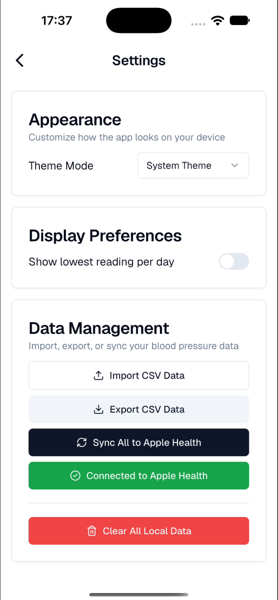
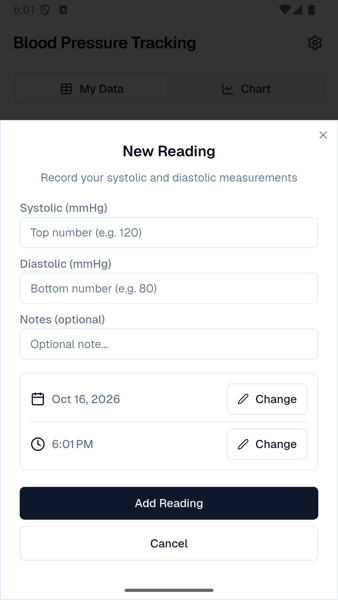
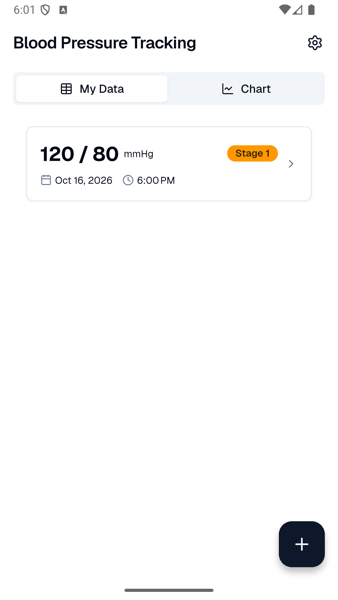
Updating the pigeon definition
To enable iOS support, there are a couple dependencies that need to be added.
$ flutter pub add ffi objective_c dev:ffigen dev:swiftgen dev:swift2objcffi enables C-interop between Dart code and the host operating system. objective_c allows for mapping between Objective-C foundational types and Dart and supports the ffigen package.
ffigen, swiftgen, and swift2objc support generating Dart binding code for C/Objective-C(ffigen), Swift, and facilitating communication between Swift and Objective-C.
The pigeon file also needs a couple more lines to specify Swift options and settings.
@ConfigurePigeon(
  PigeonOptions(
    dartOut: 'lib/src/gen/health_connect.g.dart',
    kotlinOut:
        'android/src/main/kotlin/com/example/health_pigeon/HealthPigeon.g.kt',
    kotlinOptions: KotlinOptions(
      package: 'com.example.health_pigeon',
      useJni: true,
      appDirectory: 'example',
      jnigenOptions: JnigenOptions(
        config: JnigenConfig(androidSdk: AndroidSdk(androidExample: 'example')),
      ),
    ),
    // New section
    swiftOut: 'ios/health_pigeon/Sources/health_pigeon/HealthPigeon.g.swift',
    swiftOptions: SwiftOptions(
        useFfi: true,
        ffiModuleName: 'health_pigeon'
    ),
    dartPackageName: 'blood_pressure_app',
  ),
)
useFfi: true makes Pigeon generate Objective-C @objc interfaces and signatures compatible with Dart FFI.
An unexpected difference is the name of the class that registers the generated native API, _ApiRegistrar on Android and _ApiSetup on iOS.
 /// Returns instance of HealthConnectApiForNativeInterop with specified [channelName] if one has been registered.
  static HealthConnectApiForNativeInterop? getInstance({String channelName = defaultInstanceName}) {
    final HealthConnectApiForNativeInterop res;
    if (Platform.isAndroid) {
      final jni_bridge.HealthConnectApiRegistrar? link =
          jni_bridge.HealthConnectApiRegistrar().getInstance(channelName.toJString());
      if (link == null) {
        _throwNoInstanceError(channelName);
      }
      res = HealthConnectApiForNativeInterop._withRegistrar(jniApi: link);
    } else if (Platform.isIOS || Platform.isMacOS) {
      final ffi_bridge.HealthConnectApiSetup? link =
          ffi_bridge.HealthConnectApiSetup.getInstanceWithName(NSString(channelName));
      if (link == null) {
        _throwNoInstanceError(channelName);
      }
      res = HealthConnectApiForNativeInterop._withRegistrar(ffiApi: link);
    } else {
      throw UnsupportedError('Native Interop is not supported on this platform. Use HealthConnectApi instead.');
    }
    return res;
  }
Implementing the iOS API
Health Connect on Android creates discrete classes for each type, eg there is a BloodPressureRecord object. HealthKit instead uses two HKQuantitySample base objects with a type identifier argument, either bloodPressureDiastolic or bloodPressureSystolic, and bundles them into a HKCorrelation with the bloodPressure type. I’m not as fluent with HealthKit as I am with Health Connect so I gave the clanker my existing Android implementation and said go make an equivalent iOS version. The indirection involved in creating records probably would have taken much more time.
public class HealthPigeonPlugin: NSObject, FlutterPlugin, HealthConnectApi {
  private let healthStore = HKHealthStore()

  private var systolicType: HKQuantityType? {
    HKQuantityType.quantityType(forIdentifier: .bloodPressureSystolic)
  }

  private var diastolicType: HKQuantityType? {
    HKQuantityType.quantityType(forIdentifier: .bloodPressureDiastolic)
  }

  private var bloodPressureCorrelationType: HKCorrelationType? {
    HKCorrelationType.correlationType(forIdentifier: .bloodPressure)
  }

  public static func register(with registrar: FlutterPluginRegistrar) {
    let instance = HealthPigeonPlugin()
    HealthConnectApiSetup.register(api: instance)
  }

  // ...

  func writeBloodPressure(record: BloodPressureRecordPigeon) async throws {
    guard HKHealthStore.isHealthDataAvailable() else {
      throw PigeonError(
        code: "HEALTH_DATA_UNAVAILABLE",
        message: "HealthKit is not available on this device",
        details: nil
      )
    }
    guard let systolicType = systolicType,
          let diastolicType = diastolicType,
          let correlationType = bloodPressureCorrelationType else {
      throw PigeonError(
        code: "INVALID_TYPES",
        message: "Blood pressure quantity types are unavailable",
        details: nil
      )
    }

    let date = Date(timeIntervalSince1970: TimeInterval(record.dateMillis) / 1000.0)
    let mmhgUnit = HKUnit.millimeterOfMercury()

    let systolicQuantity = HKQuantity(unit: mmhgUnit, doubleValue: Double(record.systolic))
    let diastolicQuantity = HKQuantity(unit: mmhgUnit, doubleValue: Double(record.diastolic))

    let metadata: [String: Any] = [
      HKMetadataKeyWasUserEntered: true
    ]

    let systolicSample = HKQuantitySample(
      type: systolicType,
      quantity: systolicQuantity,
      start: date,
      end: date,
      metadata: metadata
    )

    let diastolicSample = HKQuantitySample(
      type: diastolicType,
      quantity: diastolicQuantity,
      start: date,
      end: date,
      metadata: metadata
    )

    let objects: Set<HKSample> = [systolicSample, diastolicSample]
    let correlation = HKCorrelation(
      type: correlationType,
      start: date,
      end: date,
      objects: objects,
      metadata: metadata
    )

    try await withCheckedThrowingContinuation { (continuation: CheckedContinuation<Void, Error>) in
      healthStore.save(correlation) { success, error in
        if let error = error {
          continuation.resume(throwing: error)
        } else {
          continuation.resume(returning: ())
        }
      }
    }
  }
}
Updating the Service Layer and UI
Because most operations are handled at the native API and plugin layer, the service class in my example app only required a small update for what happens when requesting permissions. Android has an alternate flow if permission was requested and denied before. It doesn’t let you request via the same Activity contract over and over. The change in the settings_view is superficial, it toggles a string value based on the observed platform.
Future<void> requestPermissions() async {
    try {
      if (await _api.hasPermissions()) {
        isConnected.value = true;
        return;
      }
      await _api.requestPermissions();
      await _updateConnectionStatus();
      if (!isConnected.value && Platform.isAndroid) {
        // Health Connect only prompts once via activity contract.
        // If permissions remain ungranted, redirect to Health Connect settings.
        await _api.openHealthConnectSettings();
      }
    } catch (e) {
      print("Error requesting permissions via FFI: $e");
    }
}class SettingsView extends StatelessWidget {
const SettingsView({super.key, required this.controller});
static const routeName = '/settings';
final SettingsController controller;
@override
Widget build(BuildContext context) {
final theme = ShadTheme.of(context);
final serviceName = Platform.isIOS ? 'Apple Health' : 'Health Connect'; // Conditional check
return Scaffold(
appBar: AppBar(
title: Text('Settings', style: theme.textTheme.h4),
),
//...
)General iOS Settings and Configurations
The remaining work is XCode/iOS specific things like broadening the accepted source files in the project’s podspec file, adding Swift Package Manager package listings for the generated project, and adding entitlements and permission strings in plist files.
Now we have a completed cross-platform app that communicated with both Android and iOS’s host health platforms.
You can check out the full pigeon-based plugin.