Building a Scalable Foundation with Pigeon FFI: Refactoring a jnigen-based Flutter app for cross-platform compatibility
As part of native interop and pigeon getting more stable, I’m continuing my effort of updating my Google IO 2025 demo to modern standards.
At that time, I was trying to highlight jnigen but it’s time to move it to Pigeon.
What we're building
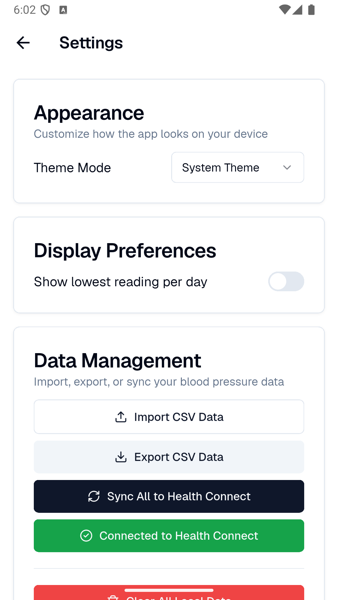
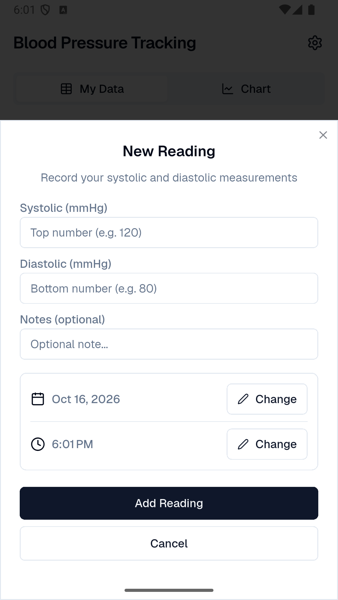
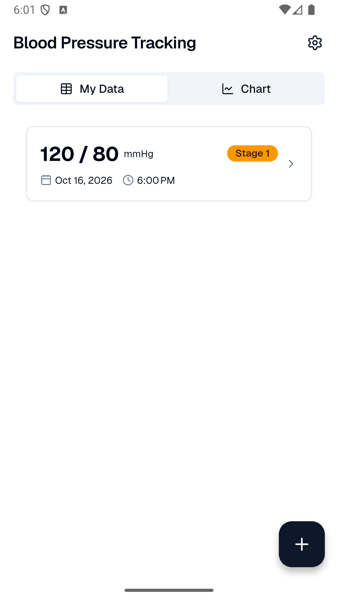
Here’s how the final app looks:
Why move from `jnigen` to `pigeon` ?
Using jnigen was valid at the time and it’s valid now. It just doesn’t meet the brief as well. Using raw JNI is kind of an effort in hunting and pecking, and generally, extra cognitive load. You can’t just say, I need these couple of functions. You have to identify the classes you need for your intended functionality and also whatever additional classes that are meaningfully referenced. The jnigen.dart file below is a good example of this from the former project. It’s pretty involved because of all the classes that need Dart bindings. We have the usual suspects from the HealthConnect API but half of the classes relate to general Android lifecycle things.
import 'dart:io';

import 'package:jnigen/jnigen.dart';

void main(List<String> args) {
  final packageRoot = Platform.script.resolve('../');
  generateJniBindings(
    Config(
      outputConfig: OutputConfig(
        dartConfig: DartCodeOutputConfig(
          // Define the output path for your generated Dart files.
          path: packageRoot.resolve('lib/gen/'),
          structure: OutputStructure.packageStructure,
        ),
      ),
      androidSdkConfig: AndroidSdkConfig(
        addGradleDeps: true,
        addGradleSources: false,
      ),
      // Add your target Java/Kotlin classes here.
      classes: [
        'androidx.health.connect.client.HealthConnectClient',
        'androidx.health.connect.client.PermissionController',
        'androidx.health.connect.client.units.Pressure',
        'androidx.health.connect.client.permission.HealthPermission',
        'androidx.health.connect.client.records.BloodPressureRecord',
        'androidx.health.connect.client.records.metadata.Metadata',
        'androidx.health.connect.client.records.metadata.DataOrigin',
        'androidx.health.connect.client.response.InsertRecordsResponse',
        'androidx.health.connect.client.response.ReadRecordsResponse',
        'androidx.health.connect.client.time.TimeRangeFilter',
        'androidx.health.connect.client.request.ReadRecordsRequest',
        'androidx.activity.result.ActivityResultCallback',
        'androidx.activity.result.ActivityResult',
        'androidx.activity.result.ActivityResultLauncher',
        'androidx.activity.result.contract.ActivityResultContracts',
        'androidx.activity.ComponentActivity',
        'androidx.fragment.app.FragmentActivity',
        'android.content.Intent',
        'java.time.Instant',
        'java.time.ZoneOffset',
        'java.time.ZonedDateTime',
        // 'kotlin.jvm.JvmClassMappingKt',
      ],
    ),
  );
}
All together they add 26,000 LOC for about 5 functions that we’ll actually use.
Caveats of shifting native interop builds
One of the teachable moments I got from moving through and between the different native interop methods is the importance of keeping your build pristine. jnigen/ffigen need a clean Android build to generate Dart bindings from them. This was a bit harder to manage with raw JNI because a unforeseen required class or from using the wrong generated binding function could make the build fragile and prone to breakage. If you take a move fast and break things strategy, you can easily find yourself in a circular dependency bad state where you can’t get a clean apk / ipa because of a Dart problem and you can’t get your bindings built because you have a native build problem. Commit often.
Greenfielding the app
The current implementation of the app is deeply coupled to the JNI bindings. This complicates the process of adding another platform so the best thing to do is to start with a new plugin as it will resolve some of the circular dependency problems.
I’m coding iOS next and greenfielding simplifies things. So the flow will be getting Android working first and then using an agent to smooth over the edges of getting an iOS implementation. You’ve seen it several times before if you’ve been following my posts but for completeness, here’s the start of creating the project
$ flutter create --template=plugin --platforms=android,ios health_pigeon
$ cd health_pigeon
$ flutter pub add jni
$ flutter pub add dev:pigeon dev:jnigen dev:logging dev:path
Writing the pigeon definition
Here’s the full pigeon configuration. Look at what ISN’T here. Those twenty odd classes from the previous version specifying what bindings to generate.
import 'package:pigeon/pigeon.dart';

@ConfigurePigeon(
  PigeonOptions(
    appDirectory: './',
    dartOut: 'lib/src/gen/health_connect.g.dart',
    kotlinOut: 'android/app/src/main/kotlin/com/example/blood_pressure/pigeon/HealthPigeon.g.kt',
    kotlinOptions: KotlinOptions(
      package: 'com.example.blood_pressure.pigeon',
      useJni: true,
      jniClassPaths: <String>['build/app/tmp/kotlin-classes/debug'],
    ),
    dartPackageName: 'blood_pressure_app',
  ),
)
class BloodPressureRecordPigeon {
  BloodPressureRecordPigeon({
    required this.systolic,
    required this.diastolic,
    required this.dateMillis,
  });

  int systolic, diastolic, dateMillis;
}

@HostApi()
abstract class HealthConnectApi {
  @async
  bool hasPermissions();

  @async
  void requestPermissions();

  @async
  List<BloodPressureRecordPigeon> readBloodPressure(int startMillis, int endMillis);

  @async
  void writeBloodPressure(BloodPressureRecordPigeon record);
}
A new thing that is here that wasn’t in the Permissions example from this post is a BloodPressureRecordPigeon class that acts as a Data Transfer Object. This is a "dumb" version of the BPRecord class from the main app (now in the example app). BPRecord does conversions from user-friendly parameters like DateTime to millisecondsSinceEpoch. Many of the functions in Health Connect are async so the @async annotation makes sure that the generated code is properly Future/suspend.
|
Note
|
You might need to disable the Instantiable lint check to prevent FlutterFragmentActivity from throwing a false-positive error.
|
Implementing the Android API
In the previous version, health_connect_service.dart was a service layer class that used native calls to call Health Connect. In this jnigen function below (from the original code), most of it is plumbing and not actually doing the task of saving a record. There is the Activity access that might be expected but there is manual management of resources with release and coersion into Java collection types.
 Future<void> insertBloodPressure(BPRecord record) async {
    try {
      var activityPtr = jni.Jni.getCurrentActivity();
      if (activityPtr.isNull) {
        activityPtr = jni.Jni.getCachedApplicationContext();
      }
      if (activityPtr.isNull) {
        print("HealthConnectService: No context available for insertion");
        return;
      }

      final client = HealthConnectClient.Companion.getOrCreate$1(
        jni.JObject.fromReference(activityPtr),
      );

      final systolic = Pressure.millimetersOfMercury(record.systolic.toDouble());
      final diastolic = Pressure.millimetersOfMercury(record.diastolic.toDouble());
      final metadata = Metadata.manualEntry$2();

      final bp = BloodPressureRecord(
        record.date.toInstant(),
        getZoneOffset(),
        metadata,
        systolic,
        diastolic,
        BloodPressureRecord.BODY_POSITION_SITTING_DOWN,
        BloodPressureRecord.MEASUREMENT_LOCATION_LEFT_UPPER_ARM,
      );

      await client.insertRecords([bp].toJList(BloodPressureRecord.type));

      // Cleanup
      bp.release();
      metadata.release();
      diastolic.release();
      systolic.release();
      client.release();
    } catch (e) {
      print("Error inserting into Health Connect: $e");
    }
  }
We can now keep that code in Kotlin and it lives in the Android plugin class. It doesn’t require as much finagling that way.
class HealthPigeonPlugin : FlutterPlugin, ActivityAware, HealthConnectApi {
    private var context: Context? = null
    private var activity: Activity? = null
    private var permissionLauncher: androidx.activity.result.ActivityResultLauncher<Set<String>>? = null
    private var permissionContinuation: kotlin.coroutines.Continuation<Unit>? = null

    private val PERMISSIONS = setOf(
        HealthPermission.getReadPermission(BloodPressureRecord::class),
        HealthPermission.getWritePermission(BloodPressureRecord::class)
    )

    //...

    // Health Connect Client
    private val healthConnectClient: HealthConnectClient?
        get() = context?.let { HealthConnectClient.getOrCreate(it) }

    override suspend fun writeBloodPressure(record: BloodPressureRecordPigeon) {
        val client = healthConnectClient ?: return
        try {
            val bpRecord = BloodPressureRecord(
                systolic = Pressure.millimetersOfMercury(record.systolic.toDouble()),
                diastolic = Pressure.millimetersOfMercury(record.diastolic.toDouble()),
                time = Instant.ofEpochMilli(record.dateMillis),
                zoneOffset = ZoneOffset.UTC,
                metadata = Metadata.manualEntry()
            )
            client.insertRecords(listOf(bpRecord))
        } catch (e: Exception) {
            e.printStackTrace()
        }
    }
}
The benefit of this is not having to guess on how the bindings had to mutate when grafting Java/Kotlin features onto Dart.
Implementing a Service Layer
The new service layer has cross-platform native interop API calls, a welcome improvement over the jni/ffi wrangling in its former state. BPRecord mostly mirrors the arguments in BloodPressureRecordPigeon so it’s a little overkill, however it’s good separation of concerns to keep the latter data transport only.
import 'dart:async';
import 'dart:io' show Platform;
import 'package:signals/signals.dart';
import 'package:flutter/services.dart';
import 'package:health_pigeon/health_pigeon.dart';
import 'package:health_pigeon_example/src/data/bp_record.dart';

class HealthConnectService {
  final HealthConnectApi _api = HealthConnectApi.createWithNativeInteropApi();
  final isConnected = signal(false);

  Future<void> init() async {
    await _updateConnectionStatus();
  }

  Future<void> _updateConnectionStatus() async {
    try {
      isConnected.value = await _api.hasPermissions();
    } catch (e) {
      print("Error updating Health Connect connection status: $e");
      isConnected.value = false;
    }
  }

  Future<void> checkPermissions() => _updateConnectionStatus();

  Future<void> requestPermissions() async {
    try {
      if (await _api.hasPermissions()) {
        isConnected.value = true;
        return;
      }
      await _api.requestPermissions();
      await _updateConnectionStatus();
      if (!isConnected.value && Platform.isAndroid) {
        // Health Connect only prompts once via activity contract.
        // If permissions remain ungranted, redirect to Health Connect settings.
        await _api.openHealthConnectSettings();
      }
    } catch (e) {
      print("Error requesting permissions via FFI: $e");
    }
  }

  Future<void> openSettings() async {
    try {
      await _api.openHealthConnectSettings();
    } catch (e) {
      print("Error opening Health Connect settings: $e");
    }
  }

  Future<void> batchInsertBloodPressure(List<BPRecord> records) async {
    for (final record in records) {
      await insertBloodPressure(record);
    }
  }

  Future<void> insertBloodPressure(BPRecord record) async {
    try {
      await _api.writeBloodPressure(BloodPressureRecordPigeon(
        systolic: record.systolic,
        diastolic: record.diastolic,
        dateMillis: record.date.millisecondsSinceEpoch,
        notes: record.notes,
      ));
    } catch (e) {
      print("Error inserting into Health Connect: $e");
    }
  }

  Future<List<BPRecord>> readBloodPressure(DateTime start, DateTime end) async {
    try {
      final records = await _api.readBloodPressure(
        start.millisecondsSinceEpoch,
        end.millisecondsSinceEpoch,
      );

      return records.map((record) => BPRecord(
        date: DateTime.fromMillisecondsSinceEpoch(record.dateMillis),
        systolic: record.systolic,
        diastolic: record.diastolic,
        notes: record.notes ?? "",
      )).toList();
    } catch (e) {
      print("Error reading from Health Connect: $e");
      return [];
    }
  }
}
Bringing It All Together
I’ve remade the original demo to be the example app for this newly created plugin. In anticipation of the next post that will example the Pigeon implementation to iOS, I changed the UI to use shadcn.
Here’s a video of the full app flow.
You can check out the old codebase and the new pigeon-based plugin architecture.